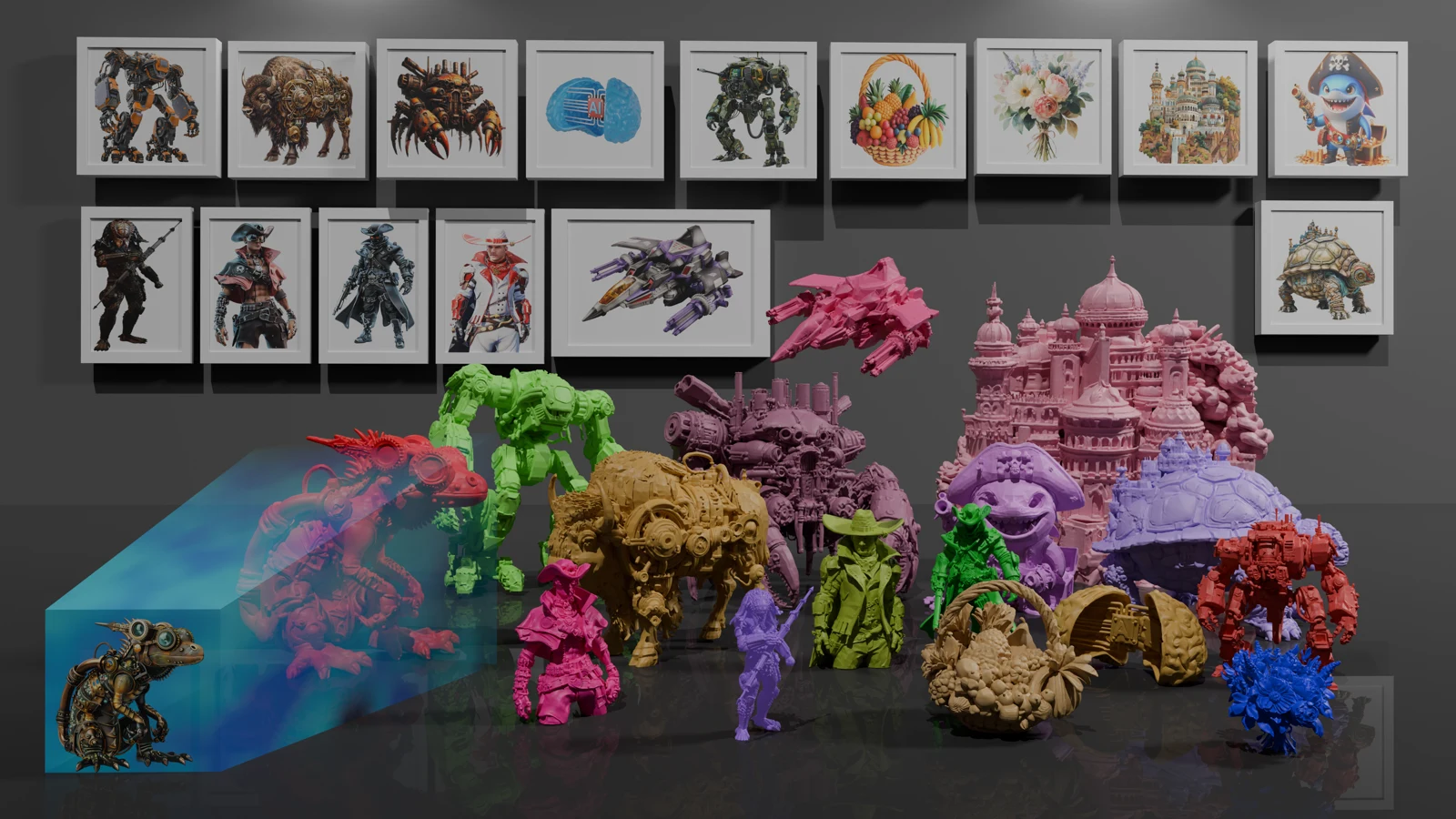
Pixal3D is a SIGGRAPH 2026 project from Tsinghua University, Tencent ARC and Victoria University of Wellington. Its current implementation uses TRELLIS.2, with single-image inference, PBR textures and a multi-view path released in September 2026.
Why pixel alignment matters
Many image-to-3D models generate in a canonical object space and use attention to inject image features. Pixal3D instead back-projects features into 3D so that a surface location has an explicit connection to pixels in the input view.
That connection targets faithful silhouettes and local details, not just a similar-looking object. The official examples include intricate creatures, mechanical parts and architecture; inspect geometry as well as textured views when judging a result.
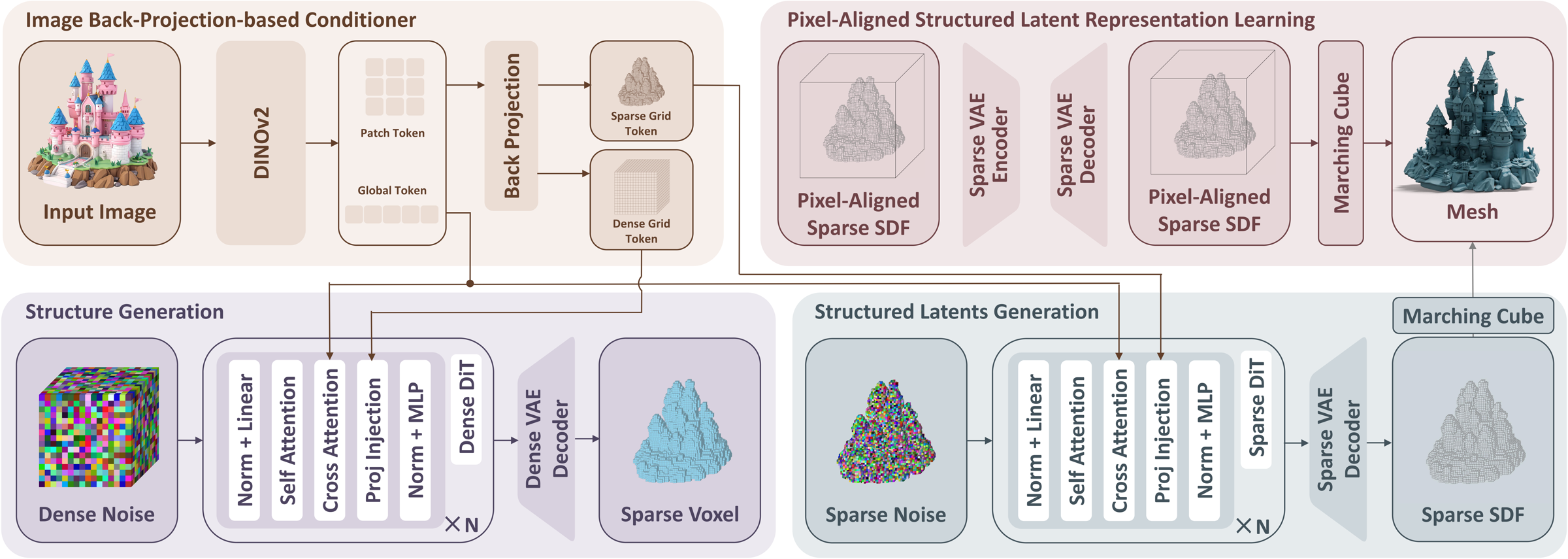
Single-image and multi-view inputs
Single-image inference takes an object image and exports a GLB. Multi-view inference combines several views of the same object using separate multi-view weights. It needs a directory of images plus transforms.json describing their cameras.
Keep image framing consistent with the camera data: the multi-view path does not crop or rescale the views. The first frame should be the canonical front view. The supplied four-view example assumes 90° intervals, zero elevation and a 20° field of view, not arbitrary photographs.
Generate and export a GLB
Set up the TRELLIS.2 environment, then install the extra Pixal3D dependencies, including NATTEN and the specified utils3d wheel. Use the official Hugging Face demo if you want to try an image without local installation.
The commands below run the single-image and multi-view paths. Standard inference defaults to resolution 1536; --low_vram loads models on demand and defaults to 1024. --resolution overrides that choice. ATTN_BACKEND=sdpa provides a fallback when FlashAttention is unavailable.
python inference.py \
  --image assets/images/0_img.png \
  --output output.glb --low_vram

python inference_mv.py \
  --views_dir assets/mv_images/example \
  --output output_mv.glb --low_vram
Use Pixal3D in ComfyUI
ComfyUI natively supports Pixal3D and TRELLIS.2 in a shared image-to-model template. Pixal3D is the default; the switch selects TRELLIS.2. The linked workflow guide covers model folders, mesh cleanup, UV unwrapping, PBR baking and export.
For reproducible paper experiments, use the original paper version based on Direct3D-S2. For the newer generation workflow, use the TRELLIS.2-based implementation. They are different versions of Pixal3D, so avoid mixing their environments and weights.
Which Pixal3D workflow should you use?
| Workflow | Input or backbone | Choose it for |
|---|---|---|
| Current single-image | One image; TRELLIS.2 | A detailed asset with geometry and PBR textures |
| Current multi-view | Images plus camera transforms; multi-view weights | Combining known viewpoints of the same object |
| Paper version | Direct3D-S2 | Reproducing the published paper experiments |
| ComfyUI template | Node-based single-image workflow | Mesh processing, material baking and export |
Frequently asked questions
Can I use multiple images without camera parameters?
The local multi-view path expects transforms.json. Reuse the supplied camera file only when your views match its four-view orbit; otherwise provide matching camera transforms and field of view.
What does low-VRAM mode change?
It loads models as needed and changes the default inference resolution from 1536 to 1024. You can set --resolution explicitly, but higher resolutions still require more memory.
Is a generated GLB ready for a game engine?
GLB is a convenient asset format, but check polygon count, UVs, material appearance and geometry before integration. The ComfyUI workflow offers mesh simplification and material-baking steps.